

How to Send Diamonds to Friends in Mobile Legends?
Four Ways to Send Diamonds to a Friend in Mobile Legends
Top‑up on WISHGM and enjoy great savings
 Up to 32% off on top‑ups
 Fast delivery within 3 mins
 Highly‑rated & trusted
 Secure transactions
Your friend just missed the skin they wanted, and now you want to help them out with some Diamonds. The problem? Mobile Legends: Bang Bang does not have a simple “Send Diamonds” button in the friend list, Shop, or settings.
That does not mean you cannot get Diamonds into your friend's account. There are several ways to help another player get Diamonds, but they work differently and come with different costs, restrictions, and risks.
In this guide, we'll explain how to send Diamonds to a friend in Mobile Legends, including the fastest option, official gifting methods, and approaches you should avoid. We'll also cover the two pieces of information you need and what to do if a top-up fails.
The good news is that you do not need your friend's password or email address. For the simplest method, you only need their ML ID and Server ID.
Why Is There No Send Diamonds Button?
Mobile Legends does not provide a direct feature for transferring Diamonds from one player's existing balance to another account. In other words, you cannot simply open your friend list, select a player, and move Diamonds from your account to theirs.
Instead, Diamonds are added directly to the account receiving the top-up. This is why helping a friend usually means purchasing Diamonds for their account rather than transferring Diamonds from your own balance.
For most players, the simplest solution is to top up the friend's account directly using their account information.
You don't need to be friends for a certain amount of time, and you don't need access to their login credentials.
Method 1: Top Up Directly to Their Account
The fastest and most straightforward option is to purchase Diamonds for your friend's account instead of trying to transfer Diamonds that you already own.
How to Top Up Diamonds for a Friend
1.Ask your friend for their ML ID and Server ID.
2,Go to a trusted top-up platform such as WISHGM and select Mobile Legends: Bang Bang.
3.Enter your friend's ML ID and Server ID. Make sure you are entering their information rather than your own.
4.Wait for the account nickname to appear and compare it with your friend's in-game name.
5.Select the desired Diamond package and complete the payment.
6.Once the order is processed, the Diamonds will be added directly to their account.
For a direct top-up option, you can also check Mobile Legends Bang Bang Top Up.
This method means your friend receives actual Diamonds in their own account, so they can decide whether to spend them on a skin, event, draw, or other in-game content. You also never need to ask for their password or log into their account.
Depending on the platform and payment method, the Diamonds may arrive within a few minutes.
The Two Numbers You Need
Before paying, double-check the two numbers provided by your friend.
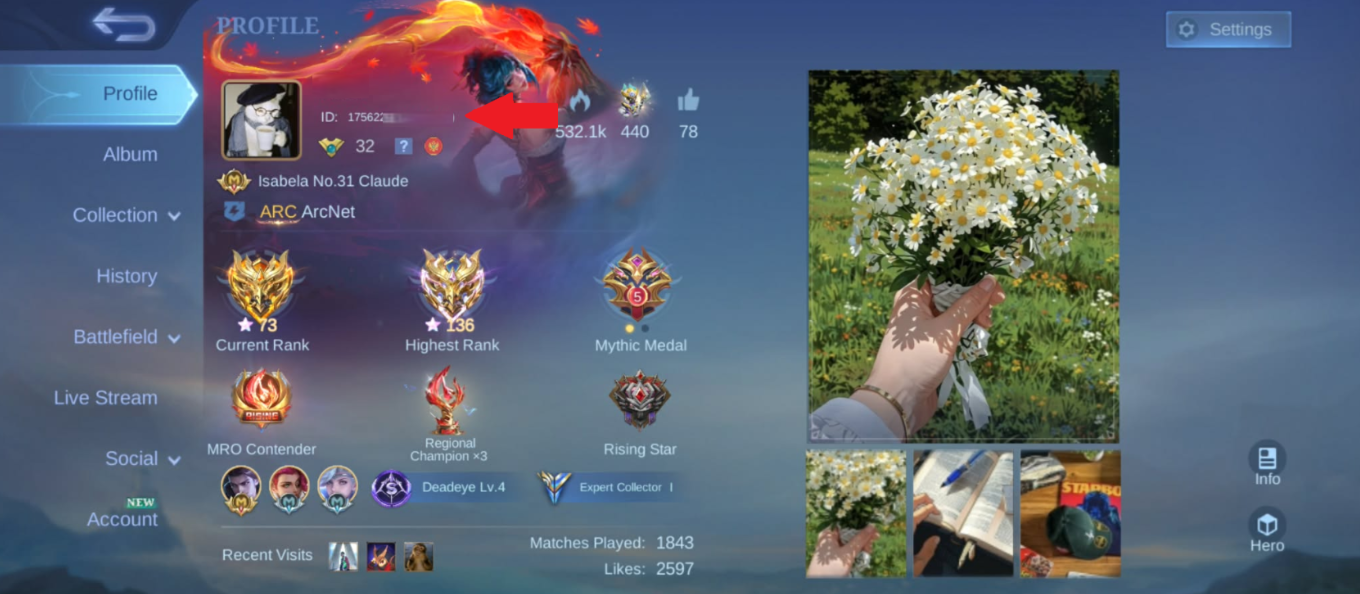
Open the Mobile Legends profile by tapping the profile picture in the top-left corner. Under the player's name, you should see an account number and a number in brackets, such as:
123456789 (2222)
The first number is the ML ID, also commonly referred to as the User ID or UID. The number in brackets is the Server ID, which some top-up platforms may call the Zone ID.
If possible, ask your friend to send you a screenshot of this section rather than copying the numbers manually. This reduces the chance of entering the wrong account information.
Always Check the Nickname Before Paying
This is the most important step when topping up another player's account.
After entering the ML ID and Server ID, check the account nickname displayed by the top-up platform. Make sure it matches your friend's in-game name before confirming the payment.
If the information is incorrect, do not proceed with the purchase.
A top-up sent to the wrong account may be difficult or impossible to reverse, so spending a few seconds checking the nickname can prevent a much bigger problem.
This is the easiest option when you simply want to give a friend Diamonds. But if you already know exactly what they want, there are other gifting options worth considering.
Method 2: The In-Game Gift Feature
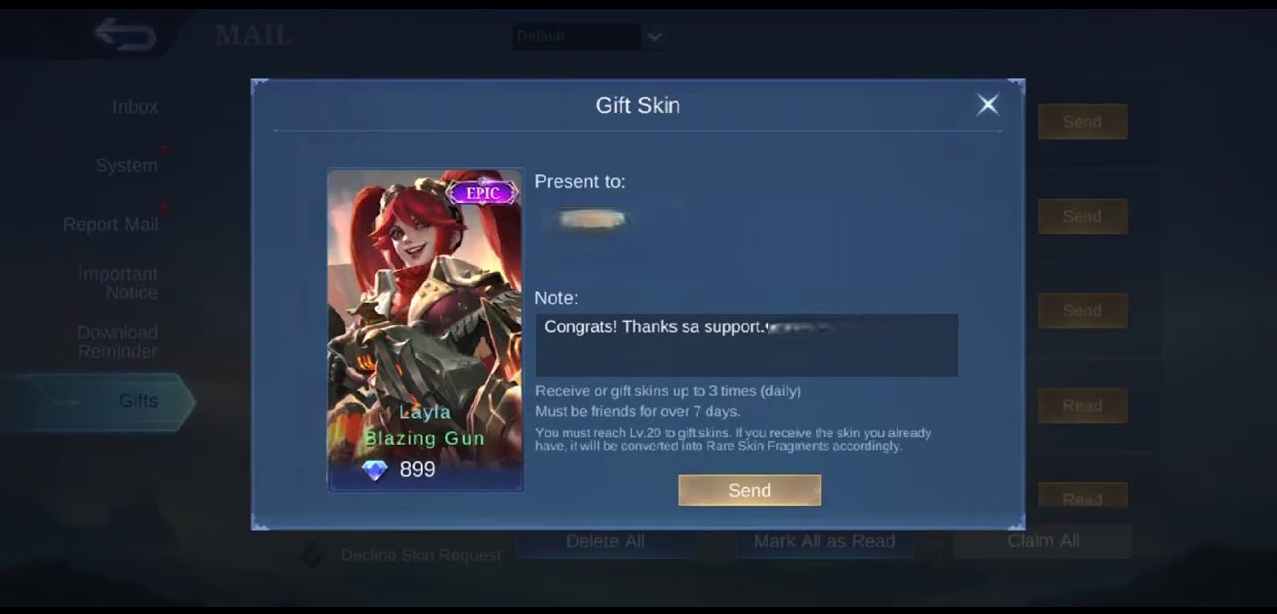
Another option is to use Mobile Legends' built-in gift feature. Instead of sending Diamonds directly, you can purchase an eligible item with your own Diamonds and send it to a friend.
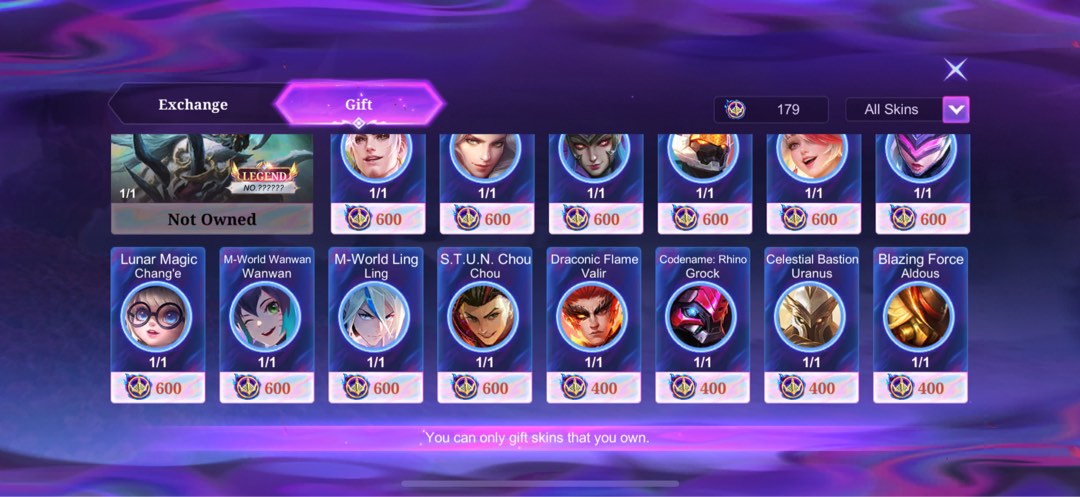
Open the Shop from the lobby and look for the gift box icon at the top of the screen. From there, choose the item you want to send, select your friend, and confirm the purchase. The gifted item will then be sent to their in-game mailbox.
What You Can Gift
The in-game gift system supports more items than many players expect. You can gift Skins, Heroes, Emotes, the Starlight Card, the Weekly Diamond Pass, and selected event items.
If an item can be gifted, you will see the gift option on its purchase screen. If there is no gift option, that item cannot be sent to another player.
Keep in mind that gifts can only be purchased using Diamonds. Battle Points cannot be used to pay for gifts.
The Rules That Trip People Up
| Requirement | What it actually means |
| Friendship age | Reported at 7 days. Adding someone after one ranked win and gifting the same night will fail. |
| Account level | Both accounts need to clear a minimum level, commonly reported as level 20. |
| Daily limit | Around 3 gift purchases per day, resetting every 24 hours. Added after anniversary events exposed large-scale gifting abuse. |
| Diamond type | Only standard Diamonds work. Promo Diamonds from recharge bonuses and coupons often get rejected at checkout. |
Once an item has been gifted, it remains permanently on the recipient's account. You cannot refund the gift or convert it back into Diamonds.
If you're not sure which skin or item your friend wants, sending Diamonds through a direct account top-up may be a better option because they can choose what to spend them on.
The Side Benefit: Familiarity Points
There is another benefit to using the in-game gifting feature. Sending a gift grants Familiarity Points based on the value of the gift, with the amount equal to 10% of the gift's value.
Familiarity can also be earned by playing together. You can gain 6 points per Ranked match, 3 per Classic match, and 2 per other modes, with match-based Familiarity capped at 150 points per week.
Gifting does not count toward this weekly match limit. So, if you were already planning to buy your duo a skin, using the gift feature can help increase your Familiarity at the same time.
If your main goal is to give your friend an item while also increasing Familiarity, Method 2 can be a useful choice.
Method 3: Livestream Gifts and BB Coins
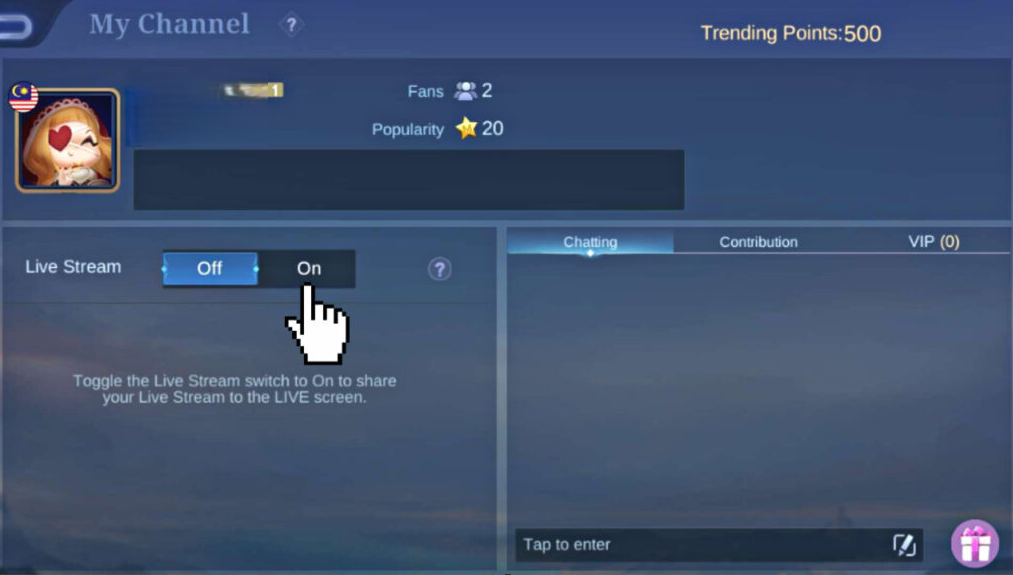
If your friend streams inside Mobile Legends, you can send them virtual gifts during their livestream. These gifts are converted into BB Coins, which can then be converted into Diamonds.
However, this is not an efficient way to give someone Diamonds.
The published conversion rate is 1 gift = 1 BB Coin, while 5 BB Coins = 1 Diamond. That means you would need to spend five gifts to provide your friend with the equivalent of one Diamond.
Livestream gifting is mainly designed to support creators and contribute to their popularity ranking rather than serve as a way to transfer Diamonds between friends.
It's useful if you want to support your friend's stream, but it is not a practical option if your goal is simply to give them Diamonds.
Method 3 uses your own Diamonds inefficiently, while Method 4 comes with a much bigger risk.
Method 4: Sharing Their Login (Don't)
Another method sometimes recommended by players is to log into your friend's account and purchase Diamonds directly from their account.
Although this can technically work, it is not recommended.
Account sharing violates the game's terms of service, and either account could potentially be suspended. Logging in from an unfamiliar device can also trigger security checks and potentially cause problems with the account.
More importantly, sharing login details means giving another person full access to an account that may contain years of progress and purchases.
There is little reason to take that risk when you can top up the same account using only the ML ID and Server ID, without needing the account password.
For most players, Method 1 is the safer and simpler way to get Diamonds directly into a friend's account.
So Which One Should You Use?
| Method | What They Get | Speed | The Verdict |
| 1. Top up by ML ID | Real Diamonds | Minutes | Best pick for pretty much everyone. Cheapest, fastest, no requirements. |
| 2. In-game gift | One skin, hero, or pass | Instant | Best when you know what they want, or you're farming Affinity with a duo. |
| 3. Livestream gifts | BB Coins, at a heavy loss | Slow | Good for hype, terrible for value. That five-to-one rate is rough. |
| 4. Account sharing | Real Diamonds | Minutes | Just don't. Risks a ban on both accounts for no benefit. |
Gift Failed? Here's Why
If a gift doesn't go through, check these common reasons one by one.
1."Cannot gift to this player." Your friendship may be too new. The reported waiting period is 7 days from when you added each other, rather than just 24 hours.
2.No gift option on the item. The item is purchase-only. Not every item in the Shop supports gifting, and there is no workaround if the gift option is unavailable.
3.Payment rejected despite having Diamonds. Check whether the Diamonds in your balance came from a recharge bonus or coupon. These promotional Diamonds may not be available for gift purchases.
4.Blocked after a couple of successful gifts. You may have reached the daily gift limit. The limit resets every 24 hours.
Everything looks fine but nothing arrives. Ask your friend to check their in-game mailbox rather than their inventory. Gifts are delivered there until they are claimed.
If none of these situations applies, the problem may be related to the game's service. In that case, contacting in-game customer service is the appropriate next step.
Four Mistakes That Can Cost You Real Money
Anyone offering to "transfer" Diamonds by asking for your login details should be treated with caution. There is no direct Diamond transfer feature, so never give someone your password, verification code, or linked email just so they can supposedly send Diamonds to your account.
Typing the ML ID from memory. Ask your friend for a screenshot of their profile information whenever possible. One incorrect number can send the top-up to the wrong account.
Mixing up the two numbers. The Server ID is the number shown in brackets. Double-check both numbers before confirming the order.
Buying from an unknown seller in a comment section. Use a top-up platform with proper support channels and clear transaction policies instead of sending money to an unverified seller.
Conclusion
There is no direct Send Diamonds button in Mobile Legends: Bang Bang, but that doesn't mean you can't help a friend get Diamonds.
If you want them to decide how to use the currency themselves, a direct top-up to their account is the simplest option. Just ask for their ML ID and Server ID, enter the information carefully, verify the account nickname, and select the Diamond package you want to purchase.
If you'd rather give them a specific skin or item, the in-game gift feature is a better fit. Meanwhile, livestream gifts are more suitable for supporting creators, while sharing account login information is best avoided.
For direct Mobile Legends top-ups, WISHGM provides a convenient way to purchase Diamonds for the account you choose. Always double-check the account information before completing a purchase, and you'll be ready to surprise your friend with their next batch of Diamonds.